Get started with FortiDevSec in 3 easy steps
Commands to configure for SAST and DAST scan accordingly in your Jenkins | | Configure | Add build step | Execute Shell
SAST Scan:
env | grep -E "JENKINS_HOME|BUILD_ID|GIT_BRANCH|GIT_COMMIT" > /tmp/env
docker run --pull always --rm --env-file /tmp/env --mount type=bind,source=$PWD,target=/scan registry.fortidevsec.forticloud.com/fdevsec_sast:latest
DAST Scan:
env | grep -E "JENKINS_HOME|BUILD_ID|GIT_BRANCH|GIT_COMMIT" > /tmp/env
docker run --pull always --rm --env-file /tmp/env --mount type=bind,source=$PWD,target=/scan registry.fortidevsec.forticloud.com/fdevsec_dast:latestSample code segment to configure SAST and DAST scan accordingly in your .travis.yml file
SAST Scan:
language: python
python:
    - "3.6"
services:
    - docker
jobs:
    include:
        - stage: SAST
        	script:
            	-env | grep -E "TRAVIS|TRAVIS_BUILD_ID|TRAVIS_BRANCH|TRAVIS_COMMIT" > /tmp/env
            	-docker run --pull always --rm --env-file /tmp/env --mount type=bind,source=$PWD,target=/scan registry.fortidevsec.forticloud.com/fdevsec_sast:latest
DAST Scan:
language: python
python:
    - "3.6"
services:
    - docker
jobs:
    include:
        - stage: DAST
        	script:
				-env | grep -E "TRAVIS|TRAVIS_BUILD_ID|TRAVIS_BRANCH|TRAVIS_COMMIT" > /tmp/env
-docker run --pull always --rm --env-file /tmp/env --mount type=bind,source=$PWD,target=/scan registry.fortidevsec.forticloud.com/fdevsec_dast:latestWe have a CircleCl Orb. Sample code segment to configure SAST and DAST scan accordingly in your .circleci/config.yml file
SAST Scan:
version: 2.1
jobs:
    SAST:
        machine: yes
        steps:
          - checkout
          - run: |
               env | grep -E "CIRCLECI|CIRCLE_BUILD_NUM|CIRCLE_BRANCH|CIRCLE_SHA1" > /tmp/env
               docker run --pull always --rm --env-file /tmp/env --mount type=bind,source=$PWD,target=/scan registry.fortidevsec.forticloud.com/fdevsec_sast:latest
workflows:
    Scans:
        jobs:
          - SAST
DAST Scan:
version: 2.1
jobs:
    DAST:
        machine: yes
        steps:
          - checkout
          - run: |
               env | grep -E "CIRCLECI|CIRCLE_BUILD_NUM|CIRCLE_BRANCH|CIRCLE_SHA1" > /tmp/env
               docker run --pull always --rm --env-file /tmp/env --mount type=bind,source=$PWD,target=/scan registry.fortidevsec.forticloud.com/fdevsec_dast:latest
workflows:
    Scans:
        jobs:
- DASTSample code segment to configure SAST and DAST scan accordingly in your main.yml file
SAST Scan:
name: FortiDevSec Scanner CI
on:
    push:
        branches: [ master ]
    pull_request:
        branches: [ master ]
jobs:
    build:
        runs-on: ubuntu-latest
        steps:
        - uses: actions/checkout@v2
        - name: SAST
          run: |
            env | grep -E "GITHUB_ACTIONS|GITHUB_RUN_NUMBER|GITHUB_REF_NAME|GITHUB_SHA" > /tmp/env
            docker run --pull always --rm --env-file /tmp/env --mount type=bind,source=$PWD,target=/scan registry.fortidevsec.forticloud.com/fdevsec_sast:latest
DAST Scan:
name: FortiDevSec Scanner CI
on:
    push:
        branches: [ master ]
    pull_request:
        branches: [ master ]
jobs:
    build:
        runs-on: ubuntu-latest
        steps:
        - uses: actions/checkout@v2
        - name: SAST
          run: |
            env | grep -E "GITHUB_ACTIONS|GITHUB_RUN_NUMBER|GITHUB_REF_NAME|GITHUB_SHA" > /tmp/env
docker run --pull always --rm --env-file /tmp/env --mount type=bind,source=$PWD,target=/scan registry.fortidevsec.forticloud.com/fdevsec_dast:latestSample code segment to configure SAST and DAST scan accordingly in your bamboo.yml file
SAST Scan:
--

version: 2
plan:
    project-key: MYAPP
    name: Build the myapp
    key: MYAPP
 stages:
  -scan the myapp stage:
       jobs:
          -- Scan
Scan:
   tasks:
       - clean        # To keep the working directory clean
     -script:
      - env | grep -E "bamboo_buildNumber|bamboo_repository_branch_name|bamboo_repository_revision_number" > /tmp/env
      - docker run --pull always --rm --env-file /tmp/env --mount type=bind,source=$PWD,target=/scan registry.fortidevsec.forticloud.com/fdevsec_sast:latest
DAST Scan:
--

version: 2
plan:
    project-key: MYAPP
    name: Build the myapp
    key: MYAPP
 stages:
  -scan the myapp stage:
       jobs:
          -- Scan
Scan:
   tasks:
       - clean        # To keep the working directory clean
     -script:
      - env | grep -E "bamboo_buildNumber|bamboo_repository_branch_name|bamboo_repository_revision_number" > /tmp/env
- docker run --pull always --rm --env-file /tmp/env --mount type=bind,source=$PWD,target=/scan registry.fortidevsec.forticloud.com/fdevsec_dast:latestSample code segment to configure SAST and DAST scan accordingly in your azure-pipelines.yml file
SAST Scan:
trigger:
  - main
pool:
  vmImage: 'ubuntu-latest'

stages:
  - stage:SAST
	displayName: 'Static Application Security Testing (SAST) Stage'
	jobs:
  	  - job:RunSAST
		displayName: 'Run SAST'
		steps:
    	  - task: Bash@3
      		displayName: Install_Run_SAST
      		inputs:
        	  targetType: 'inline'
        	  script: |
            	env | grep -E "AZURE_HTTP_USER_AGENT|BUILD_BUILDID|BUILD_SOURCEBRANCHNAME|BUILD_SOURCEVERSION" > /tmp/env
            	docker run --pull always --rm --env-file /tmp/env --mount type=bind,source="$PWD",target=/scan registry.fortidevsec.forticloud.com/fdevsec_sast:latest
DAST Scan:
trigger:
  - main
pool:
  vmImage: 'ubuntu-latest'

stages:
  - stage:DAST
	displayName: 'Dynamic Application Security Testing (DAST) Stage'
  	jobs:
  	  - job:RunDAST
		displayName: 'Run DAST'
		steps:
    	  - task: Bash@3
      		displayName: Install_Run_DAST
      		inputs:
        	  targetType: 'inline'
        	  script: |
            	env | grep -E "AZURE_HTTP_USER_AGENT|BUILD_BUILDID|BUILD_SOURCEBRANCHNAME|BUILD_SOURCEVERSION" > /tmp/env
docker run --pull always --rm --env-file /tmp/env --mount type=bind,source="$PWD",target=/scan registry.fortidevsec.forticloud.com/fdevsec_dast:latestSample code segment to configure SAST and DAST scan accordingly in your gitlab-ci.yml file to perform scans using Shell executor provided by the GitLab Runner.
SAST Scan:
SAST:
  stage: build
  script:
	- env_file=`mktemp`
	- env | grep -E "GITLAB_CI|CI_BUILD_ID|CI_DEFAULT_BRANCH|CI_COMMIT_SHA|CI_PIPELINE_IID" > $env_file
	- docker run --pull always --rm --env-file $env_file --mount type=bind, source=$PWD, target=/scan registry.fortidevsec.forticloud.com/fdevsec_sast:latest
	- rm $env_file
  tags:
	- devsecops
DAST Scan:
DAST:
  stage: deploy
  script:
	  - env_file=`mktemp`
	  - env | grep -E "GITLAB_CI|CI_BUILD_ID|CI_DEFAULT_BRANCH|CI_COMMIT_SHA|CI_PIPELINE_IID" > $env_file
	  - docker run --pull always --rm --env-file $env_file --mount type=bind, source=$PWD, target=/scan registry.fortidevsec.forticloud.com/fdevsec_dast:latest
	  - rm $env_file
  tags:
	  - devsecops
Sample code segment to configure SAST scan accordingly in your buildspec.yml file
SAST Scan:
version: 0.1
phases:
    install:
        commands:
            - echo "Entered the install phase..."
        finally:
            - echo "This always runs even if the update or install command fails"
    pre_build:
        commands:
            - echo "Entered the pre_build phase..."
        finally:
            - echo "This always runs even if the login command fails."
    build:
        commands:
            - echo "Entered the build phase..."
            - echo "Build started on `date`"
        finally:
            - echo "This always runs even if the install command fails"
    post_build:
        on-failure: CONTINUE
        commands:
            - echo "Entered the post_build phase..."
            - echo "Build completed on `date`"
            - echo "Running FortiDevSec SAST scanner..."
            - env | grep -E "CODEBUILD_CI|CODEBUILD_BUILD_NUMBER|CODEBUILD_RESOLVED_SOURCE_VERSION" > /tmp/env
- "docker run --pull always --rm --env-file /tmp/env --mount type=bind,source=$PWD,target=/scan registry.fortidevsec.forticloud.com/fdevsec_sast:latest"Sample code segment to configure SAST and DAST scan accordingly in your cloudbuild.yaml file
SAST Scan:
steps:

# Run FortiDevSec SAST Scanner, once the build step is done.
- name: 'gcr.io/cloud-builders/docker'
  entrypoint: bash
  args: ['-c','docker run --pull always --rm --env GCP_CLOUDBUILD_CI=$GCP_CLOUDBUILD_CI --env BUILD_ID=$BUILD_ID --env BRANCH_NAME=$BRANCH_NAME --env COMMIT_SHA=$COMMIT_SHA --mount type=bind,source=$(pwd),target=/scan registry.fortidevsec.forticloud.com/fdevsec_sast:latest']
DAST Scan:
steps:

# Run FortiDevSec DAST Scanner, once the deploy step is done.
- name: 'gcr.io/cloud-builders/docker'
  entrypoint: bash
args: ['-c','docker run --pull always --rm --env GCP_CLOUDBUILD_CI=$GCP_CLOUDBUILD_CI --env BUILD_ID=$BUILD_ID --env BRANCH_NAME=$BRANCH_NAME --env COMMIT_SHA=$COMMIT_SHA --mount type=bind,source=$(pwd),target=/scan registry.fortidevsec.forticloud.com/fdevsec_dast:latest']Sample code segment to configure SAST and DAST scan accordingly in your drone.yml file
SAST Scan:
---
kind: pipeline
type: exec
name: SCAN

platform:
    os: linux
    arch: amd64

steps:
#Run FortiDevSec SAST Scanner, once the build step is done.
- name: SAST
  commands:
  - env | grep -E "DRONE|DRONE_BUILD_NUMBER|CI_COMMIT_BRANCH|CI_COMMIT_SHA" > /tmp/env
  - docker run --pull always --rm --env-file /tmp/env --mount type=bind,source=$PWD,target=/scan registry.fortidevsec.forticloud.com/fdevsec_sast:latest
DAST Scan:
---
kind: pipeline
type: exec
name: SCAN

platform:
    os: linux
    arch: amd64

steps:
#Run FortiDevSec SAST Scanner, once the build step is done.
- name: DAST
  commands:
  - env | grep -E "DRONE|DRONE_BUILD_NUMBER|CI_COMMIT_BRANCH|CI_COMMIT_SHA" > /tmp/env
- docker run --pull always --rm --env-file /tmp/env --mount type=bind,source=$PWD,target=/scan registry.fortidevsec.forticloud.com/fdevsec_dast:latestSample code segment to configure scans accordingly in your configuration file
SAST Scan:
name: sast
on:
	push:
		branches:
			- main
jobs:
	run-container:
		runs-on:ubuntu-latest
		steps:
			-name:Checkout code
			  uses:actions/checkout@v2
			-name:Setup JFrog CLI
			  uses:jfrog/setup-jfrog-cli@v3
			env:
				JF_UR:${{ secrets.JF_URL }}
				JF_ACCESS_TOKEN:${{ secrets.JF_ACCESS_TOKEN }}

			-name: Run Docker Container
			run:|
				env_file=`mktemp`
				env | grep -E "JFROG_CLI_BUILD_NUMBER" > $env_file
				docker run --pull always --rm --mount type=bind,source="$(pwd)",target=/scan registry.fortidevsec.forticloud.com/fdevsec_sast:latest
				rm $env_file
DAST Scan:
name: dast
on:
	push:
		branches:
			- main
jobs:
	run-container:
		runs-on:ubuntu-latest
		steps:
			-name:Checkout code
			  uses:actions/checkout@v2
			-name:Setup JFrog CLI
			  uses:jfrog/setup-jfrog-cli@v3
			env:
				JF_UR:${{ secrets.JF_URL }}
				JF_ACCESS_TOKEN:${{ secrets.JF_ACCESS_TOKEN }}

			-name: Run Docker Container
			run:|
				env_file=`mktemp`
				env | grep -E "JFROG_CLI_BUILD_NUMBER" > $env_file
				docker run --pull always --rm --mount type=bind,source="$(pwd)",target=/scan registry.fortidevsec.forticloud.com/fdevsec_dast:latest
				rm $env_file
Sample code segment to configure scans accordingly in your configuration file
SAST Scan:
default:
	image:docker:latest

include:
	-remote:"https://releases.jfrog.io/artifactory/jfrog-cli/gitlab/v2/.setup-jfrog-unix.yml"

jfrog-docker-build:
	variables:
		IMAGE_NAME:sample.jfrog.io/jfrog-gitlab-docker/jfrog-docker-example-image:$CI_PIPELINE_IID
		JFROG_CLI_BUILD_NAME:JFROG_CLI_BUILD_NAME
		JFROG_CLI_BUILD_NUMBER:$CI_PIPELINE_IID

	tags:
		-gitlab-org-docker
	services:
		-docker:dind
	script:
		-env_file=`mktemp`
		-env | grep -E "JFROG_CLI_BUILD_NUMBER" > $env_file
		-docker run --pull always --rm --env-file $env_file --mount type=bind,source="$(pwd)",target=/scan registry.fortidevsec.forticloud.com/fdevsec_sast:latest
		-rm $env_file
DAST Scan:
default:
	image:docker:latest

include:
	-remote:"https://releases.jfrog.io/artifactory/jfrog-cli/gitlab/v2/.setup-jfrog-unix.yml"

jfrog-docker-build:
	variables:
		IMAGE_NAME:sample.jfrog.io/jfrog-gitlab-docker/jfrog-docker-example-image:$CI_PIPELINE_IID
		JFROG_CLI_BUILD_NAME:JFROG_CLI_BUILD_NAME
		JFROG_CLI_BUILD_NUMBER:$CI_PIPELINE_IID

	tags:
		-gitlab-org-docker
	services:
		-docker:dind
	script:
		-env_file=`mktemp`
		-env | grep -E "JFROG_CLI_BUILD_NUMBER" > $env_file
		-docker run --pull always --rm --env-file $env_file --mount type=bind,source="$(pwd)",target=/scan registry.fortidevsec.forticloud.com/fdevsec_dast:latest
-rm $env_fileSample code segment to configure scans accordingly in your configuration file
SAST Scan:
pipelines:
default:
	- step :
		runs-on:
			- self.hosted
			- linux
		name: Build and Scan
		services:
			- docker
		script:
			- env_file=`mktemp`
			- env | grep -E "BITBUCKET_PROJECT_UUID|BITBUCKET_BUILD_NUMBER|BITBUCKET_BRANCH|BITBUCKET_COMMIT" > $env_file
			- docker run --pull always --rm --env-file $env_file -v "$(pwd)":/scan registry.fortidevsec.forticloud.com/fdevsec_sast:latest
			-rm $env_file
DAST Scan:
pipelines:
default:
	- step :
		runs-on:
			- self.hosted
			- linux
		name: Build and Scan
		services:
			- docker
		script:
			- env_file=`mktemp`
			- env | grep -E "BITBUCKET_PROJECT_UUID|BITBUCKET_BUILD_NUMBER|BITBUCKET_BRANCH|BITBUCKET_COMMIT" > $env_file
			- docker run --pull always --rm --env-file $env_file -v "$(pwd)":/scan registry.fortidevsec.forticloud.com/fdevsec_dast:latest
-rm $env_file Check in this fortidevsec.yaml file in the root folder of your source code.
id:
    org: ee697602-d593-42b3-a1c9-e94669e64f94
    app: aa2bb615-fb36-4b7d-a3fb-31d9f9465382

# Optional parameters.
scanners:
    - sast
    - secret
    - sca
    - dast

languages:
    - python
    - javascript

exclude_path:
    - directory path or name that must be excluded

dast:
    url: https://your.url.com
    full_scan: true       # true | false

resource:
    serial_scan: false        # true | false

fail_pipeline:
risk_rating: <1-9> Based on your app’s language, architecture and settings, FortiDevSec automatically figures out which open source scanners, and which types of scans (SAST,DAST,SCA, secrets, etc) are appropriate.
FortiDevSec automatically downloads the latest docker image of those scanners, and executes the scansin a docker container on your CI/CD machine
The scan results are uploaded to FortiDevSec cloud, and you can review them in FortiDevSec portal
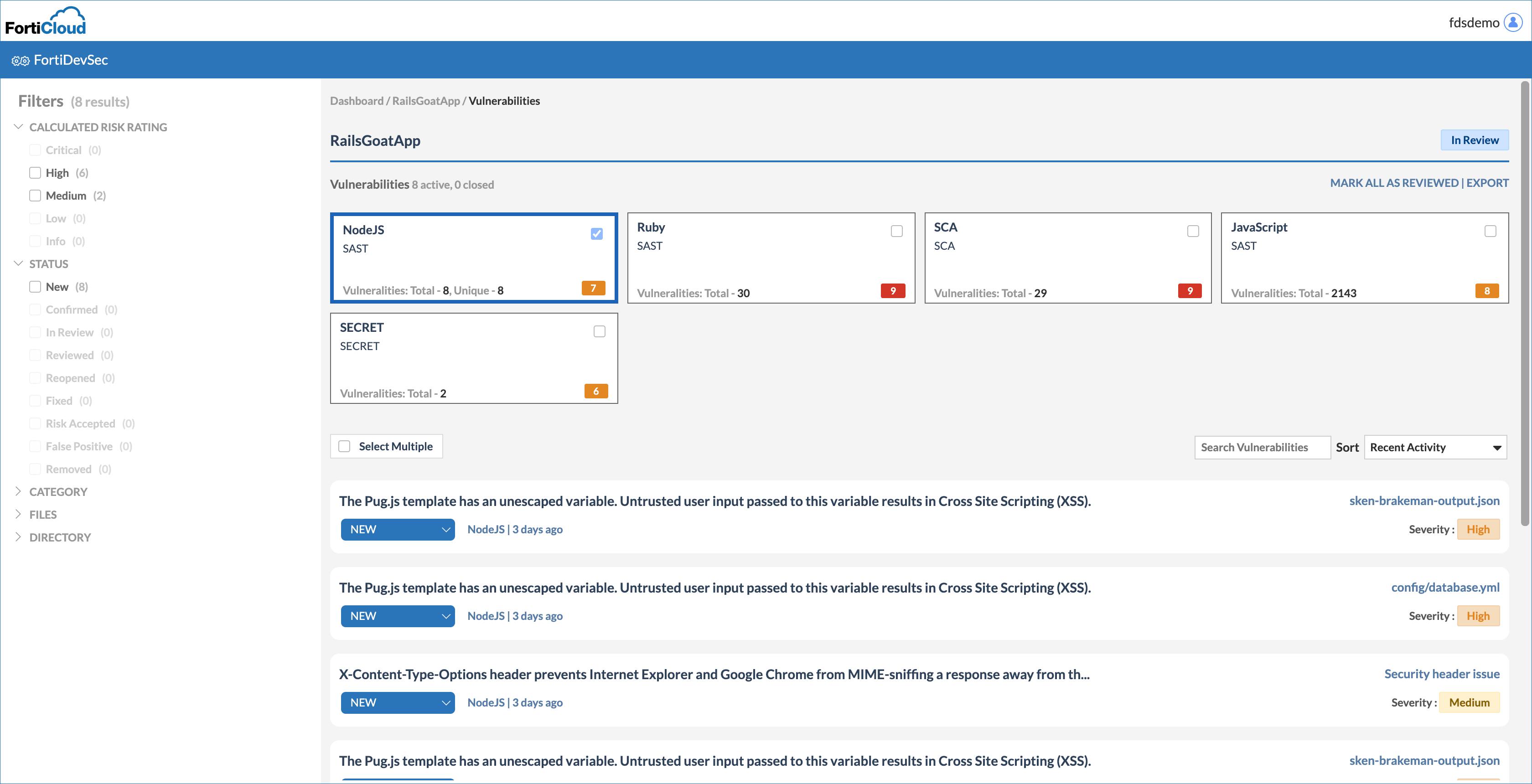
FortiDevSec incorporates continuous application security seamlessly into the devops process by including security testing in CI/CD.

Build and Deploy Secure Apps Faster
Find security issues during your SDLC

Integrate Security With CI/CD
2-Line CLI Integration With CI/CD

Single CI/CD automation layer for all app security scan types
Unified configuration for all scans in one YAML

Scanners packaged and managed automatically
No need to set up, install or update scanners

No more siloed plugins
No need for multiple scanners and multiple plugins

Dockerized scanners
Always use fresh copy of scanners